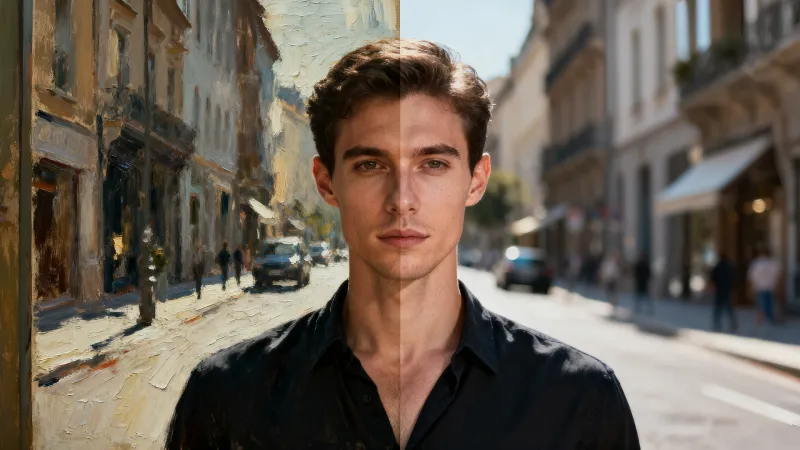
Style Transfer
Repaint a photo in an artistic style like Van Gogh, anime, watercolor, or cyberpunk for a unique look.
Style Transfer
Repaint a photo in an artistic style like Van Gogh, anime, watercolor, or cyberpunk for a unique look.
Style Transfer
Repaint a photo in an artistic style like Van Gogh, anime, watercolor, or cyberpunk for a unique look.
Remix area

No shared posts yet.
AI Style Transfer: Transform Photos into Famous Art Styles
Aitopia's AI style transfer turns any photo into a stylized artwork while preserving the original composition. Upload your image, pick a style - Van Gogh's swirls, Monet's brushwork, anime line art, watercolor, pop art - and the model rerenders the scene with the chosen aesthetic. Your subject and setting stay intact; only the visual style changes.
What Is AI Style Transfer?
AI style transfer is a technique that separates the content of an image from its style, then recombines them. Content is the subject and composition; style is the brushwork, color palette, and texture. By transferring style from a reference artwork onto your photo, the model produces a new image that has your subject rendered in the reference's visual language.
How Aitopia's AI Style Transfer Works
Style transfer on Aitopia is built around picking and previewing styles fast.
1. Upload Your Photo
Any photo works - portraits, landscapes, products, pets. Higher resolution gives more detail in the final artwork.
2. Choose a Style
Pick from a library of curated styles (Van Gogh, watercolor, pop art, anime, etc.) or upload your own reference image to transfer that style onto your photo.
3. Adjust Strength and Generate
Tune how strong the stylization is - subtle artistic touch or full painterly transformation. Generate, compare, and download.
Common Use Cases
Wall art and prints. Turn a vacation photo, a portrait, or a pet picture into framed artwork that feels far more personal than a generic print.
Social media content. Stand out in feeds with stylized posts that don't look like every other photo filter.
Gifts and personal projects. Custom art portraits, anniversary gifts, or themed birthday cards in any artistic style imaginable.
Brand and editorial illustration. Convert standard product or location shots into stylized hero images that match a campaign's visual identity.
Why Choose Aitopia's AI Style Transfer
Composition preserved. Your subject stays clearly recognizable. The model changes how the image looks, not what it shows.
Adjustable style strength. Subtle artistic enhancement or full painterly takeover - control how far the transfer goes for each image.
Custom style references. Beyond the preset library, upload any artwork to transfer its specific style onto your photo.
Tips for Better Results
- Higher-contrast photos translate better into many art styles, especially impressionist and pop art looks.
- Portraits work well with painterly styles; landscapes shine with brushwork-heavy references.
- If the result is too abstract, lower the style strength; if it's too close to the original, increase it.
- Run the same photo through 3-4 different styles before committing - the best match is rarely the obvious one.
- Pair with the upscaler if you plan to print large; style transfer outputs sometimes need a sharpening pass.
Try AI Style Transfer Now
Stop applying the same Instagram filter as everyone else. Aitopia's AI style transfer produces real artworks from your photos - in any style you can imagine.
Frequently Asked Questions
- Will my subject still look like itself?
- Yes. The composition and recognizable features stay; only the visual style changes.
- Can I use the stylized output commercially?
- Output you generate from your own photos is yours to use under Aitopia's standard terms. Be cautious about referencing specific living artists for commercial work.
- Does it work on videos?
- The image style transfer works on stills. For video stylization, use the dedicated video tools in Aitopia.